
Basics
 Getting Started
War of Dusk plays itself in a thin strip above the Windows taskbar. Your heroes walk, fight, level up and collect loot while you use your PC; you step in whenever you want to make a call. This guide covers what you need to start strong.
On this page
The strip
The strip is the game window. It stays visible right above the taskbar and shows the heroes in the field, the monsters, the region boss and the party portraits with HP, MP and active effects. Nothing there demands attention: combat, skills and loot all happen on their own.
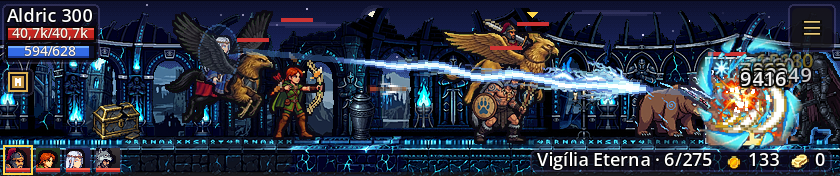
- Drag: hold and drag the strip anywhere; the position is saved. Docked to the taskbar it only slides sideways — pull it up to undock it.
- Portraits: click to focus that hero (the windows switch to them). Right-click: Change Region or Leave the Field.
- Effects: click the seal next to the bars to see every buff and debuff with its time left.
- Invites: party and duel invites show up on the strip; click to answer.
Controls and windows
The menu button on the right end of the strip — or a right-click anywhere on it — opens every window. Each window also toggles with its own key, and Esc closes the open windows.
| Window | Key | What for |
|---|---|---|
| Forge | F1 | Refining, Composition 4 → 1 and +10 with gems. |
| Map | F2 | Cities, regions, quests and where each hero hunts. |
| Codex | F3 | The encyclopedia: items, monsters, bosses, drops with real odds and every rule. |
| Options | F4 | Window, performance, audio and the game's automation. |
| Character | F5 | Equipment and bag, attributes, skills, characters, quests and duels. |
| Chest | F6 | The Account Chest, shared by every character. |
| Party | G | Invites, leader and the party of up to four heroes. |
| Skills | K | The class's three paths, the hotbar and resets. |
| Mount | M | The Stable: hatch eggs, ride, feed and evolve. |
| Quests | menu | Every quest by category, with entry and reward. |
The Character window holds almost everything about your hero in tabs: Equipment (with the bag), Basic and Advanced (attributes and stats), Skills, Characters and Duels. Quests open from the menu or from there.
Characters and heroes in the field
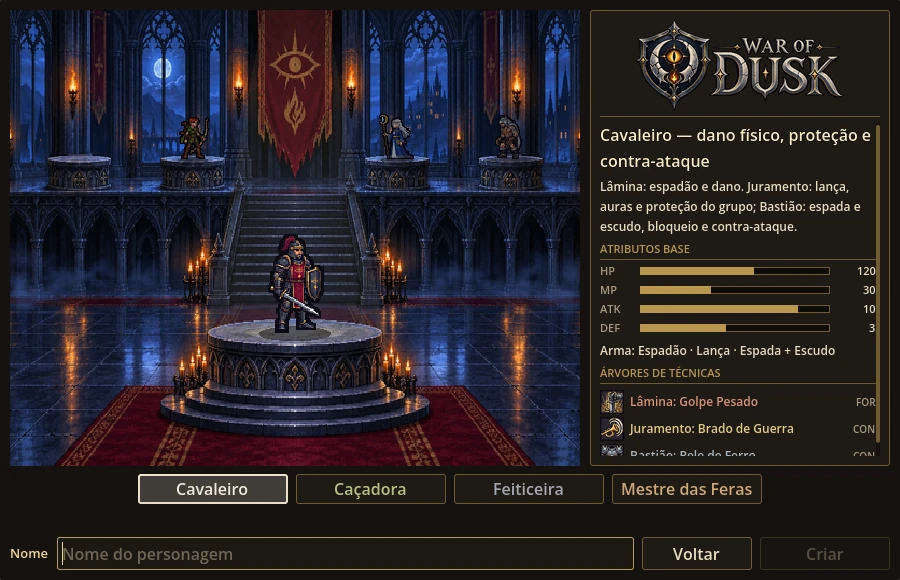
You can have up to 4 characters of any class — even four of the same one. Each starts at level 1 with the class starter weapon, a Recruit jerkin and the first skill on the bar.
Several heroes can be in the field at once, each in their own region or all together as a party. Put heroes in and out of the field in the Characters tab of the Character window; the focused hero is the one the windows show.
Picking a class? See Classes.
Your first hour
The game opens with a short five-tip tutorial (you can replay it from Options). Your hero starts in Ashen Fields, the first region of Lantern Ford, and hunts on their own right away.
- Let them hunt. In the first levels your hero regenerates HP quickly, and each level's points go into the class attributes automatically. After 35 kills the region boss shows up: Goblin King of the Fields.
- Beat the boss to move on. Beating the boss without dying clears the region and unlocks the next one; with Auto-advance on (the default), the hunt moves on by itself. Dying first resets the kill count.
- Learn skills. With the gold monsters drop, open Skills (K) and learn the next ones in your path. Every active skill you learn joins the auto bar on its own.
- Equip what drops. Items go to the bag (F5). Drag them onto the slot or right-click. Refine with Orichalcum at the Forge (F1) — up to +3 the odds are high and items never break.
- Do the Training Field. The first quest runs from level 1 to 35. Its entry (Instructor's Whistle) drops in the Lantern Ford regions. Each character's first completion grants the full Recruit set and the class weapon at +3.
Leveling pace when hunting in a region of your level: level 10 in about 20 min, 30 in ~2 h, 50 in ~5 h, 100 in ~35 h, 250 in ~300 h and 400 in ~1,350 h. Offline progress counts the same.
Auto modes
Each hero has an auto mode that decides where they hunt. Change it in Character → Characters (per hero) or Options → Game (the active hero).
| Mode | What it does |
|---|---|
| Normal | Follows the map: hunts the current region and, with Auto-advance on, moves to the next one after beating the boss. |
| Leveling | Hunts the XP region for the hero's level that drops quest entries, without advancing. Pairs with auto-entering quests. |
| Farming | Goes for drops: the Hunting Grounds first, then the drop region for your level with the highest equipment tier, without advancing. |
Other automation (Options → Game):
| Option | Default | What it does |
|---|---|---|
| Auto-distribute points | on | Each level's attribute points go into the class distribution. |
| Auto-combine dust | on | 10 dust turn into 1 refine stone on their own. |
| Auto-advance when a region is cleared | on | Once the boss falls, the hunt moves to the next region (offline too). |
| Auto-open XP Boxes | off | Opens the Experience Boxes of heroes in the field within their level range. |
| Auto-enter quests | off | Outside a quest, the hero uses an entry of their level from the bag — at most once every 10 min. |
Offline progress
Off by default: while the game is closed nothing happens, and it picks up where it left off. Turn it on in Options → Game → Offline progress.
- Cap
- up to 24 h at a time
- What counts
- XP, gold, drops, bosses and auto-advance, with the same rules and odds
- What doesn't
- quests and the Water Zone
- On launch
- the Offline Summary shows what each hero earned
- Time counts from the moment you turn the option on.
- With a full bag, anything that doesn't fit is lost — the Summary shows how much. Clear your bag before closing.
- Everything is computed on your PC, offline.
Next steps
- Skills — pick the right ultimate for your path.
- Forge — refining +0 → +9 with the real odds on screen; items never break.
- Map and Regions — where to level at every range.
- Party — in a party, each monster is worth up to 220% XP, split among the heroes.
Game data from October 3, 2026.